Use this guide for the Brother XM2701. Brother’s U.S. manuals page lists the Operation Manual, version 03, released May 24, 2017. The Quick Reference Guide and accessory notice are separate documents. Match your model and market; follow the manual supplied with your machine if it differs. Open the XM2701 Operation Manual.
Choose a pattern from the matching chart#
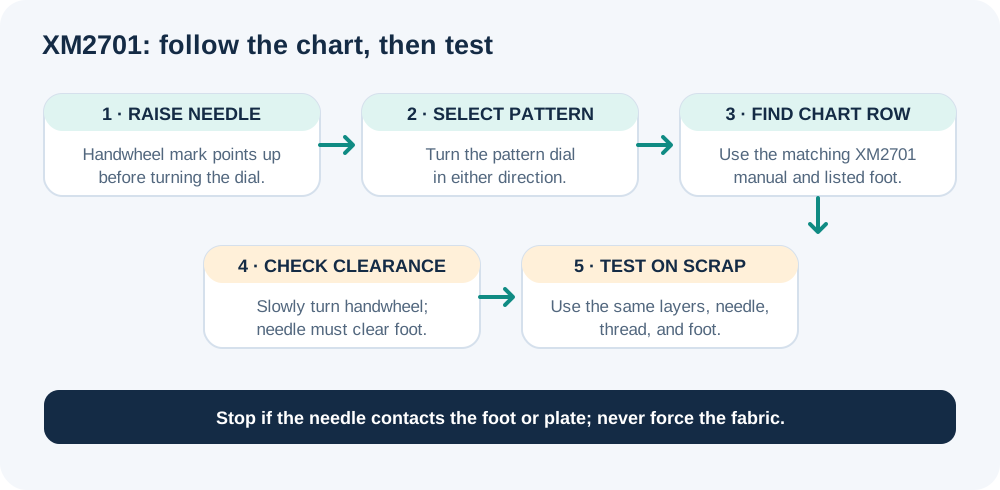
Raise the needle by turning the handwheel toward you until its mark points up before turning the pattern dial. Brother warns that turning the dial with the needle down can damage the needle, foot, or fabric. Turn the dial either way, then use the selected pattern’s row in the XM2701 chart, including its foot and limits. Don’t borrow a setting from another model’s chart.
Check which controls apply#
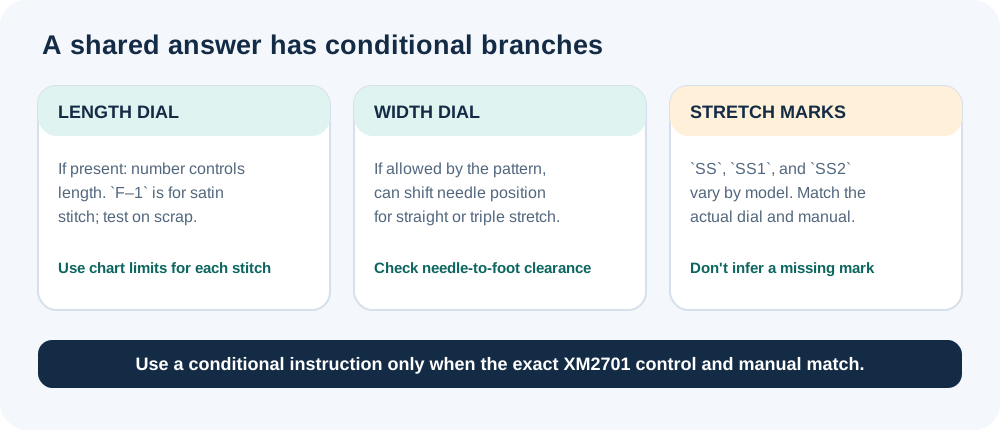
Brother’s pattern-selection answer lists XM2701 but marks some instructions as conditional. Stretch marks such as SS, SS1, and SS2 vary by model; use them only if your machine and manual show that mark. If the model has the described length dial, a higher number makes a longer stitch, 0 stops feeding, and F–1 is the satin range. Brother says the satin setting depends on fabric and thread, so test on scrap. The chart sets the limits for each pattern.
Where the matching manual allows width adjustment, Brother says a width dial can shift needle position for straight or triple-stretch stitches. After changing width, slowly turn the handwheel toward you and confirm that the needle clears the selected foot; contact can bend or break the needle. A machine-wide maximum does not apply to every pattern.
Test the setup before the project#
Use the chart’s foot and allowed settings. Test a short seam on the same fabric layers with the planned needle and thread; check stitch formation and feeding, changing one control at a time within the chart limits. If stitches bunch, stop and check the manual’s length guidance. Stop if the needle contacts the foot or plate, bends, or the machine strains. Don’t pull the fabric through.
For help matching the model label to its manual, see how to identify your sewing machine and find the correct manual. For a broader explanation of how named machines’ controls differ, see computerized vs. mechanical sewing machine controls.